Every authoring tool now says it has AI. Most of them mean a text box that writes a paragraph. A handful will actually take a topic or a PDF and hand you a finished course with lessons, quizzes and narration. This guide is about the second kind.
We compared six AI course creators on the three things that decide whether a tool is usable in practice: what it produces, how you deliver it (share link, SCORM, PDF), and what it costs once you need the features that matter. Prices were checked in September 2026 and change often, so confirm on each vendor's site before you decide.
One disclosure up front: we build LearningStudioAI, so we are not neutral. We have tried to be fair, and every claim about a competitor links to a page where you can check it.
The short version
| Tool | Best for | Full course from a topic or document | SCORM export | PDF export | Text-to-speech | Paid plans start at |
|---|---|---|---|---|---|---|
| LearningStudioAI | Solo creators and L&D teams that need a SCORM course from a document, without per-seat pricing | Yes, guided wizard | 1.2 and 2004, all paid plans | Yes | Yes, all paid plans | $39/month (5 AI courses/month) |
| Coursebox | Teams that want an LMS bundled in | Yes, prompt-based | Yes | Not listed | Yes | $30/month, credit-based |
| Mindsmith | Enterprise buyers who need SSO and per-author billing | Yes | All tiers | Reports only | Yes (ElevenLabs voices from Professional) | $39/author/month |
| MiniCourseGenerator | Bite-sized, card-style micro-courses | Micro-courses only | Pro plan | Yes | AI voiceover | $39.49/month |
| Coassemble | Organisations that want authoring, LMS and API in one workspace | Partial | Yes | Not listed | Yes, AI narration | $250/month, billed yearly |
| CourseAI | Quick prompt-to-course drafts | Yes, prompt-based | No | No | No | $19/month |
How we evaluated
Three questions, in order of how much they cost you when a tool gets them wrong.
1. Does it produce a finished course, or a draft? Prompt-based generators give you text you then arrange, illustrate and quiz yourself. Guided generators ask about the audience, depth and format first, then produce lessons, quizzes, images and audio together. The difference is hours per course. 2. Can you deliver it where your learners are? A share link is enough for a coach. A corporate L&D team needs SCORM 1.2 or 2004 for the LMS, and often a PDF for the people who will not log in. Check which formats are included and on which plan. 3. What does the plan you actually need cost? Headline prices hide per-seat pricing, AI credit limits and features locked to a higher tier. We looked at the tier that includes SCORM and narration, not the cheapest one.
We did not score marketplaces, LMS platforms without generation, or general-purpose AI writers.
1. LearningStudioAI
Best for: a solo creator or a small L&D team that needs a complete, SCORM-ready course from a topic or a document, and does not want to pay per seat.
LearningStudioAI is an AI course creator built around a guided wizard. You state the topic or upload a document, answer a few questions about audience and depth, review the generated outline, and the tool produces the full course: sections, lessons, quizzes, AI images, recaps and text-to-speech narration. A block-based editor lets you rewrite, expand, reorder and add your own voice or webcam recordings afterwards. Over 830,000 authors have created more than 1.3 million courses with it.
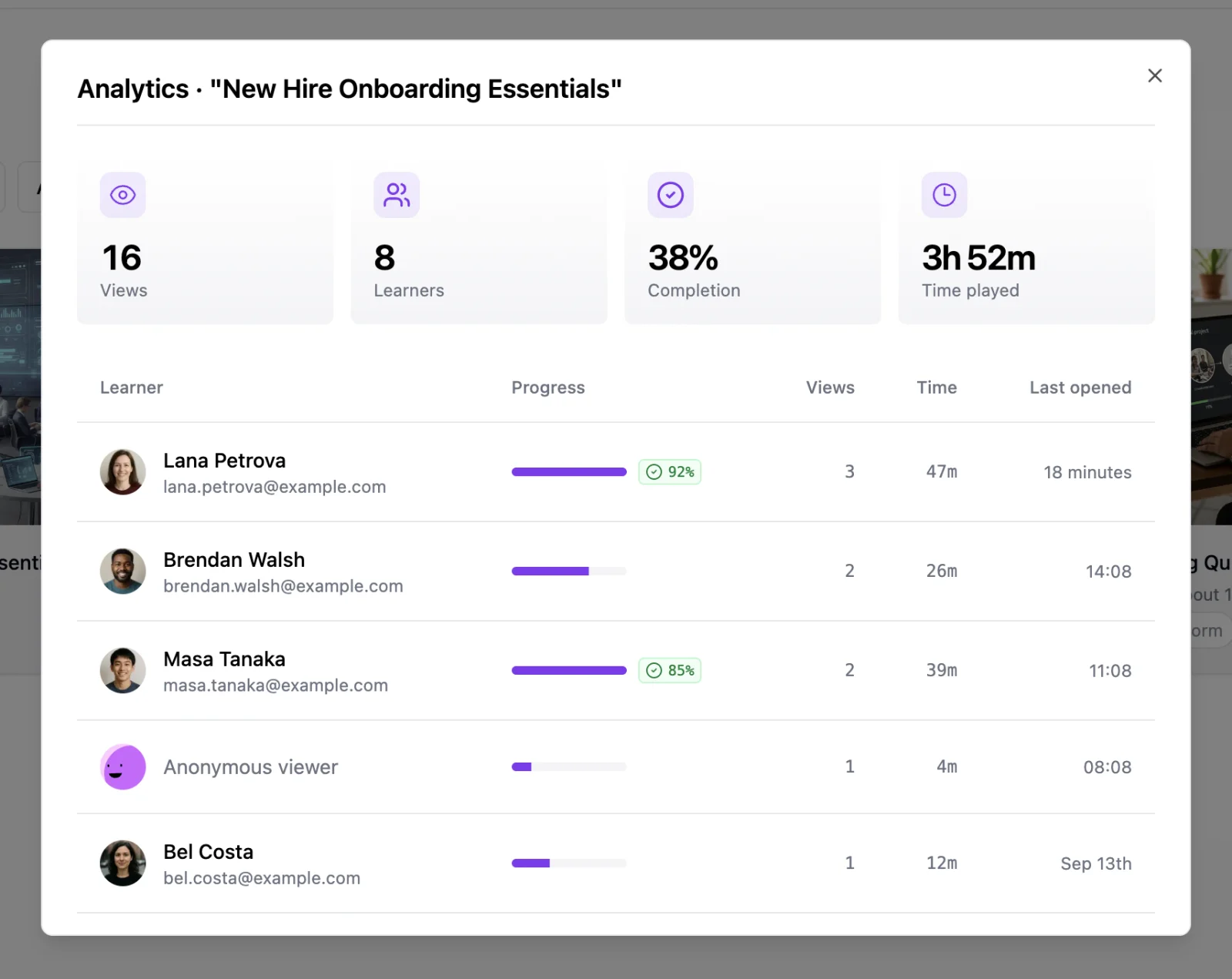
Delivery: share link with per-learner analytics (who opened it, how far they got, active time, quiz scores), SCORM 1.2 and 2004 export on every paid plan, and PDF export of the full course with layout options. An optional sign-in gate identifies learners on the share link, so you get named completion data without an LMS. None of the other five gives you that on a plain link.
Pricing: free to sign up and use the editor; AI generation needs a paid plan. Starter is $39/month for 5 AI course creations a month, 30 courses in the workspace and document imports up to 20 pages. Pro is $69/month for 15 creations, unlimited courses and 80-page imports. Enterprise is $149/month for 50 creations and 160-page imports. Every paid tier includes SCORM, PDF, narration, AI images and learner analytics. Prices are flat, not per author, and there are no separate AI credits to buy: the monthly creation count is the only cap. See plans.
Against Mindsmith at the same $39: Mindsmith bills per author and meters AI with credits on top of the seat; LearningStudioAI bills per account with a fixed creation count. Mindsmith gives you SCORM on its free tier, which we do not. LearningStudioAI gives you PDF export of the course itself, in-editor voice and webcam recording, and per-learner analytics on a share link, which Mindsmith does not. For one author who exports SCORM occasionally, Mindsmith's free tier may be enough. For an author who produces several courses a month and needs PDF or named completion data, the flat plan is cheaper and more complete.
Watch out for: the monthly creation cap is real. Five courses a month on Starter suits a creator, not a content team; budget for Pro if you generate weekly. Imports are capped by page count per plan. There is no team workspace or collaborative editing, so a multi-author team shares one account or buys several. Narration voices cover 9 languages, and the learner sign-in gate is English only. It is an authoring tool, not an LMS: enrollment, reminders and certificate management live in whatever you export to. Video generation is not a feature.
2. Coursebox
Best for: teams that want AI authoring and a lightweight LMS from one vendor.
Coursebox generates course content from prompts and bundles hosting, learner management and an AI tutor. The generation is prompt-driven, so the first output tends to need more rewriting than a guided flow, but the platform side is broader than a pure authoring tool.
Delivery: hosted courses inside Coursebox and SCORM export. PDF export is not listed on the pricing page; the Creator plan mentions course downloads, so confirm the format if PDF matters to you.
Pricing: a free plan with core AI features and unlimited learners. Creator is $30/month; an optional add-on at $70/month gives ten times the AI credits. Pro is $300/month (discounted to $150 for the first month) and adds a branded platform and custom domain. Business is $700/month with ten admin licences. Every tier is credit-limited, so heavy generation either buys the add-on or moves up a tier.
Watch out for: credit ceilings, the jump from $30 to $300 between Creator and Pro, and the amount of editing after generation. We wrote a fuller Coursebox alternative comparison.
3. Mindsmith
Best for: enterprise L&D teams that need SSO, SOC 2 and branching scenarios, and have a per-seat budget.
Mindsmith describes itself as AI-native and it shows: generation, editing suggestions and branching scenarios are all in the core product. Enterprise controls are strong.
Delivery: link, embed and SCORM on every tier, including free. Its SCORM package stays linked to the live course, so edits flow to the LMS without re-uploading. PDF export covers analytics reports and certificates, not course content.
Pricing: per author. Professional is $39 per author per month, Business is $65 per author per month, Enterprise is custom. The free tier gives 450 one-time AI credits with unlimited content and sharing, and shows a Mindsmith badge. ElevenLabs voices start on Professional; live collaboration and version history need Business; SSO is Enterprise only. A team of ten on Business is $650 per month before any extra AI credits ($1 buys 50).
Watch out for: per-author math, and a credit system on top of the seat price. Details in our Mindsmith alternative page.
4. MiniCourseGenerator
Best for: short, swipeable micro-courses for social selling, onboarding tips and lead magnets.
MiniCourseGenerator does one format very well: card-based micro-courses you scroll through on a phone. Generation is fast and the output looks polished for that format.
Delivery: hosted mini-courses and embeds, PDF export on both creator plans, and SCORM upload on the Pro plan only.
Pricing: Plus is $39.49/month and Pro is $79.99/month, with an Enterprise tier on request. SCORM, invitation-only access, certificates and webhooks are all Pro features.
Watch out for: it is not built for multi-section courses with assessments. If your content is longer than a few cards per idea, you will fight the format. See the MiniCourseGenerator alternative comparison.
5. Coassemble
Best for: organisations that want authoring, an LMS, embeddables and an API in one workspace, and can commit to an annual contract.
Coassemble has moved upmarket. It is an LMS and course builder with an API and embeddable player, sold per workspace rather than per creator. Learner analytics and team management are solid.
Delivery: hosted courses, embeds and SCORM export on every paid plan. AI narration is included, metered by monthly token allowance. PDF export is not listed.
Pricing: flat per workspace and billed yearly. Build is $3,000/year (about $250/month), Scale starts at $6,000/year, Partner starts at $24,000/year. A free sandbox gives full platform access with validation-level usage limits.
Watch out for: the annual commitment and the entry price. It is a platform decision, not a tool you try for a month. Our Coassemble alternative page has the full feature grid.
6. CourseAI
Best for: fast first drafts from a prompt when you will finish the course elsewhere.
CourseAI generates course text from prompts with a simple, product-focused interface. It is quick to try.
Delivery: hosted only. SCORM, PDF, narration and voice or webcam recording are not offered.
Pricing: Starter $19/month, Pro $49/month, Expert $249/month, tiered by course generations, hosted courses and AI image credits.
Watch out for: anything that has to reach an LMS. If SCORM is a requirement, this is not the tool. Comparison on the CourseAI alternative page. Note that CourseAI is a separate company from LearningStudioAI.
What about Articulate, iSpring and the other classic authoring tools?
The established authoring suites have added AI writing assistants, and if your team already lives in one of them, those assistants are worth turning on. They are not course generators in the sense used here: you still build the course slide by slide and the AI helps with copy. They also start at a much higher price point and a much longer learning curve. For a team that does not already own one, an AI-first tool that exports SCORM gets you to the same LMS with far less setup.
Which one should you pick?
- You need a SCORM course from a document, plus PDF and named completion data, at a flat price: LearningStudioAI. Budget for Pro if you generate more than five courses a month.
- You need enterprise controls and have a per-author budget: Mindsmith on the Business or Enterprise tier.
- You want an LMS and authoring from one vendor: Coursebox to start small, Coassemble if you are buying a platform on an annual contract.
- You publish micro-courses to phones and never touch an LMS: MiniCourseGenerator.
- You just want a text draft to finish elsewhere: CourseAI.
Frequently asked questions
What is the best free AI course generator? None of the six offers unlimited free AI generation. Coursebox's free plan includes core AI features with a credit cap, Mindsmith gives 450 one-time credits, Coassemble's free sandbox has validation-level limits, and LearningStudioAI lets you sign up free and use the editor, with AI generation on paid plans. If free generation is the requirement, expect strict caps.
Which AI course creators export SCORM? LearningStudioAI (all paid plans), Coursebox, Mindsmith (every tier), Coassemble (all paid plans) and MiniCourseGenerator on its Pro plan. CourseAI does not export SCORM.
Can AI turn a PDF into a course? Yes. LearningStudioAI converts PDF, PowerPoint and Word files into courses with lessons and quizzes; Coursebox and Mindsmith also accept documents. Check whether the tool lets you choose between staying close to the source and expanding on it.
Do I still need to edit AI-generated courses? Always, but the amount varies. Guided generators that ask about audience and depth first produce content that needs light editing. Prompt-based generators produce text you will restructure. Budget review time either way, especially for compliance content.
How did you choose these six? They are the AI course creators our readers most often compare against each other, and the ones that appear together in search results for "AI course creator". We excluded LMS platforms without generation and general AI writing tools.
---
Prices and features checked against each vendor's pricing page on 19 September 2026. If you spot something out of date, tell us and we will fix it.